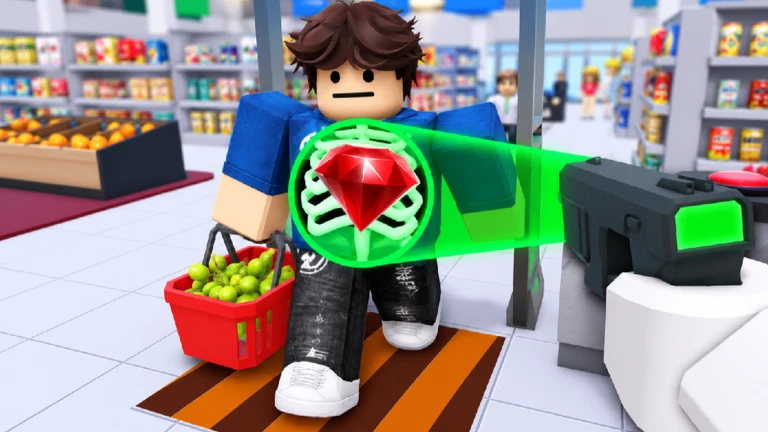
The verified loop is scan a customer at the exit, check the receipt for stolen items, catch a shoplifter before escape, earn cash, and use supported upgrades as the job becomes harder. Start with accuracy rather than speed: read the current customer's visible items and receipt, use only the action offered by the live interface, then record the result before processing another customer. Official sources do not publish the exact controls, receipt layout, penalty rules, criminal schedule, class prices, gear statistics, or final-thief trigger, so those details must come from the current session rather than an invented universal route.
Confirm the exact supermarket security game
This guide covers Roblox universe 10406744768 and root place 107573271137575 from the STOP STEALING!!! group. Roblox classifies it as Simulation and allows up to 22 players. The creator describes exit scanning, receipt checks, shoplifter interception, cash, gear, escalating difficulty, powerful criminals, and a final thief. Similar supermarket management games, Secure the Airport, Secure the Prison, and unrelated fan wikis are not evidence for this universe. Open the official experience linked here and verify the title, creator, and root place before using any controls, codes, class table, or gear advice. The public record currently exposes a second place named The Supermarket, but the root place remains the canonical entry point.
Separate the four decisions in one customer check
Treat one customer as four separate decisions: identify the person at the exit, inspect the visible scan or item state, compare it with the current receipt, and choose the action offered by the live client. The creator confirms the goals of scanning and checking for stolen items, but does not publish the receipt format, mismatch indicator, time limit, false-positive penalty, queue order, or button map. Pause long enough to read both sides before acting. If an item label is hidden, duplicated, or hard to read, preserve the uncertainty instead of guessing. A clean observation notes what the client displayed, what decision was selected, and what result appeared; it does not turn one interface layout into a permanent rule.
Use the live prompt for intervention
The official description says to catch shoplifters before they escape, but it does not define detention range, pursuit controls, weapon rules, damage, friendly fire, or what happens after a wrong accusation. Follow the current on-screen prompt and tutorial instead of using a generic arrest sequence from another security game. If the client marks a mismatch, confirm that the receipt and scanned items still belong to the same customer before intervening. When a customer leaves or a prompt changes, record the visible outcome rather than chasing an unsupported explanation. This keeps the first shift useful on desktop, mobile, tablet, and console even though device-specific controls are not published in the official listing.
Prioritize accuracy as difficulty rises
The creator states that checking more customers makes the job harder. That verifies escalation, not the formula behind it. The game may change queue speed, criminal pressure, health risk, item complexity, or another condition, but no current official source identifies which factor changes at each point. During the first session, keep a simple log after several customers: queue pressure, visible receipt complexity, missed checks, cash change, and any new threat. Change one behavior at a time, such as slowing down on multi-item receipts or positioning closer to the exit. A better result in one session is a personal operating method, not proof of a universal fastest strategy.
Read cash and gear as categories, not formulas
Official text verifies that security work earns cash and that gear can be upgraded. It does not publish cash per customer, bonuses, penalties, upgrade names, prices, levels, statistics, or a best purchase order. Before buying anything, record the exact item name, displayed cost, stated effect, current class, and cash balance. After the purchase, repeat a comparable check and note only visible changes. Do not infer a multiplier from a single payout because difficulty, customer type, class, passes, or server state may also have changed. A guide can recommend observing the current bottleneck; it cannot rank gear without a complete current roster and reproducible measurements.
Use LEVEL UP as the documented class checkpoint
Roblox exposes an enabled badge named LEVEL UP with the description Buy your first class. That is the only current official badge text that explains its action. It verifies that at least one class purchase is a tracked milestone, but not the class menu location, available class names, costs, requirements, statistics, or best choice. When the live client presents classes, capture the current list and compare the stated benefit to the player's actual problem before spending cash. After purchasing the first class, record the class name, cash change, visible effect, and badge state. A delayed badge or absent notification should be logged rather than treated as proof that the purchase failed.
Treat paid passes as optional published benefits
The creator currently lists five paid passes. Minigun permanently unlocks that item regardless of class; X-ray Vision is described as a toggleable full-screen scanner; VIP adds a chat tag and multiplies gameplay cash by 1.5; 2x Health doubles maximum health; and 2x Cash doubles gameplay cash while excluding purchased cash. These are current product descriptions, not a recommendation to spend Robux or a complete balance model. Prices and sale status can change. Compare the published benefit with the task you cannot complete, verify the current Roblox purchase screen, and never assume a pass is required for the first shift, the final thief, a badge, or an area unless the live client explicitly says so.
Keep the final thief and completion state bounded
The official listing says powerful criminals appear and the player must stop the final thief to save the supermarket. Roblox also exposes a badge titled YOU SAVED THE SUPERMARKET! Those facts establish a finale theme, but they do not publish the trigger, number of shifts, criminal roster, attacks, health, weapon requirement, checkpoints, party scaling, reward, or retry behavior. During a first run, treat any named final encounter as a new observation: record how it began, the displayed objective, the result, and any badge notification. Do not promise a complete walkthrough until a current end-to-end capture reproduces the sequence for this exact universe.
Refresh only when the player task changes
Refresh this guide when the creator changes scanning, receipt checks, shoplifter handling, cash, gear, class milestones, paid benefits, difficulty escalation, areas, criminals, or the final-thief flow. The listing still marks new supermarket areas as SOON, so no release date or area name belongs in the guide yet. CCU, visits, favorites, votes, and badge award totals are dated counters and do not justify rewriting stable instructions. New controls, codes, class rankings, cash formulas, gear tiers, or boss strategies need creator documentation or replayable exact-game evidence before publication.
What changed across observed Roblox snapshots
This is our own dated history of the same public Roblox fields. It shows observed movement, not a prediction or an explanation for why players moved.
Source: QuestSignal immutable release history · newest five observations shown
What this guide does not assume
This guide verifies exact identity, official classification and server size, the creator-published scan-receipt-catch-cash-gear loop, escalating difficulty, final-thief goal, five badge labels, the first-class badge description, and five current pass descriptions. It does not certify controls, receipt UI, penalties, customer or criminal schedules, cash formulas, class rosters, gear statistics, area release dates, boss mechanics, rewards, or codes.
Refresh trigger: Refresh when official or replayable exact-game evidence materially changes the customer-check workflow, classes, cash, gear, badges, passes, areas, criminals, or final-thief sequence.