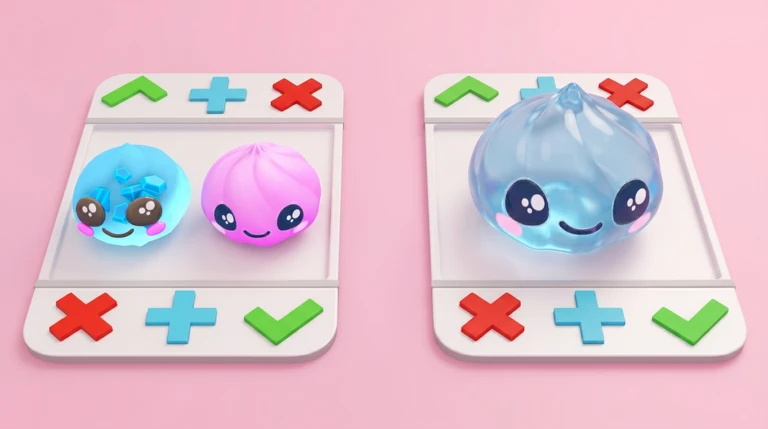
The official sequence is physical: stand on a trading board with another player, both place the items being offered, move onto the check mark together to accept, use the cross to cancel, or use the plus to request more. Before either player moves to accept, stop and compare the exact items still visible on both sides. If an item changes, a name is unclear, or the offer no longer matches the agreement, cancel and rebuild it. The creator does not publish a complete dumpling roster, official value list, rarity scale, mutation multiplier, or fair-trade formula, so a safe first trade depends on verifying the actual final offer rather than trusting a third-party number.
Confirm the exact SGR Studios experience
This guide covers Roblox universe 10217234318 and root place 88480125732253 from verified creator SGR Studios. Roblox labels it Simulation, allows up to 25 players, and exposes separate places named AFK Server and Pro Server in the same universe. Similar squishy, plush, dumpling, unboxing, or stealing games are different identities even when they use the same trend words. Open the official experience linked here and verify the creator and root place before following a trade, code, value, or rarity page. A community calculator or wiki can expose player demand, but it does not become official merely because its title matches the game.
Bring only an item the board currently accepts
The creator says both players drop the items they want to trade. That confirms item offers, but does not publish how items are acquired, which inventory states are tradable, whether every dumpling qualifies, how many slots exist, or whether cash can be added. Start after the live inventory clearly shows an item that the board accepts. Record its exact displayed name and any visible variant or status before stepping on. If the board refuses it, keep that result as a current account or item observation rather than declaring the whole category untradeable. Do not drop or transfer anything outside the official board flow simply because another player promises a later return.
Step onto the same trading board
Official instructions begin with both players standing on a trading board. Use the board instance that visibly recognizes both accounts. If nothing opens or the other player is not registered, step away and retry rather than improvising an off-board exchange. The creator does not publish board capacity, server requirements, timeout, queueing, distance detection, or device-specific controls. A current video can help identify the visual setting, but the live prompt is the authority for the session. Before adding an item, agree on which displayed names are being compared and decide that either player will cancel if the final state changes.
Build both offers before moving to accept
The second official step is for both players to drop the items they want to trade. Treat the visible board state as the offer, not chat promises or a screenshot from earlier. Add items one at a time and read both sides after each change. Count exact visible entries and distinguish similarly named items, variants, or status markers only when the current client displays them. The creator says some dumplings are rarer than others but does not publish names, rarity labels, odds, or values. Therefore item count, visual size, creator media, Robux price, and third-party popularity cannot by themselves prove that the exchange is fair.
Run a final-offer check before simultaneous acceptance
The creator's third step requires both players to move onto the check mark at the same time. Before moving, pause and restate the exact final offer from the board: your items, their items, and any visible variant or status. If either side changes while a player is approaching the check mark, stop and use cancel instead of assuming the earlier agreement still applies. The official text does not describe a lock phase, countdown, rollback, trade history, confirmation dialog, or dispute process. A simultaneous physical action leaves little room for a last-second review, so the review belongs before movement begins.
Use cancel when the state is uncertain
The official cross button cancels the trade. Use it whenever an item disappears, the names no longer match, the other player rushes acceptance, the board stops showing one account, or you cannot verify what will transfer. Canceling is not a failed negotiation; it is the supported way to return to a known state. After cancellation, reopen the board and rebuild from the first item rather than trying to remember the previous layout. The creator does not promise protection from misleading chat, impersonation, trust trades, external payments, or account recovery, so never move the transaction outside the current Roblox board or exchange credentials.
Use plus to request a specific change
The creator's fifth step says the plus button requests more items. It does not say that pressing plus sets a quantity, selects a particular dumpling, guarantees an addition, or changes value automatically. Before using it, name the exact visible change you are requesting. Once the other player modifies the board, repeat the full final-offer check. More items do not automatically make a trade better because rarity, demand, variants, and values are not defined by the official sources. A bundle of unknown items should remain unknown rather than being converted into a guessed total by an unsupported calculator.
Treat See Dumpling Worth as a feature name, not an official dataset
Roblox currently lists a paid pass named See Dumpling Worth. The title confirms that a worth-related feature is sold, but its public description is blank. It does not publish the values shown, currency unit, update source, formula, trade fairness, coverage, variant handling, or whether the number reflects rarity, shop cost, demand, or another concept. Recheck the current purchase screen before spending Robux. If the live feature displays a number, record its label and version, but do not combine it with community multipliers or claim that it guarantees a fair exchange without attributable rules.
Keep a small trade receipt for your own comparison
After a successful trade, record the check time, server place, exact items offered and received, and any visible status or variant. This is a personal transaction log, not a market price. One exchange can show that two players accepted a deal under current conditions; it cannot establish a universal value, demand score, rarity rank, or mutation multiplier. If the transfer does not match the final board state, preserve screenshots and use Roblox's current reporting and support paths. Do not attempt to reverse the trade through credentials, external payments, scripts, executors, or another unsupported exchange.
Refresh only after the trade task changes
Refresh this guide when the creator changes board entry, item placement, simultaneous acceptance, cancel, request-more behavior, item eligibility, or confirmation safeguards. Separate AFK Server and Pro Server place names are verified, but their access requirements and trade behavior are not. Codes, item lists, rarities, values, mutations, odds, and calculators require their own current evidence. CCU, visits, favorites, votes, badge awards, and video views are dated counters and do not justify rewriting a stable trade checklist.
What changed across observed Roblox snapshots
This is our own dated history of the same public Roblox fields. It shows observed movement, not a prediction or an explanation for why players moved.
Source: QuestSignal immutable release history · newest five observations shown
What this guide does not assume
This guide verifies exact identity, official classification and server size, the creator-published five-step trading-board protocol, the general statement that some dumplings are rarer, one enabled Welcome badge, five current pass names and sale states, three official universe places, current media, and current player demand. It does not certify inventory acquisition, item eligibility, roster, rarity labels, values, variants, mutations, odds, cash trading, confirmation safeguards, trade history, codes, rankings, or calculators.
Refresh trigger: Refresh when official or replayable exact-game evidence materially changes the board workflow, item eligibility, acceptance safeguards, pass behavior, places, or a previously held trade-system claim.