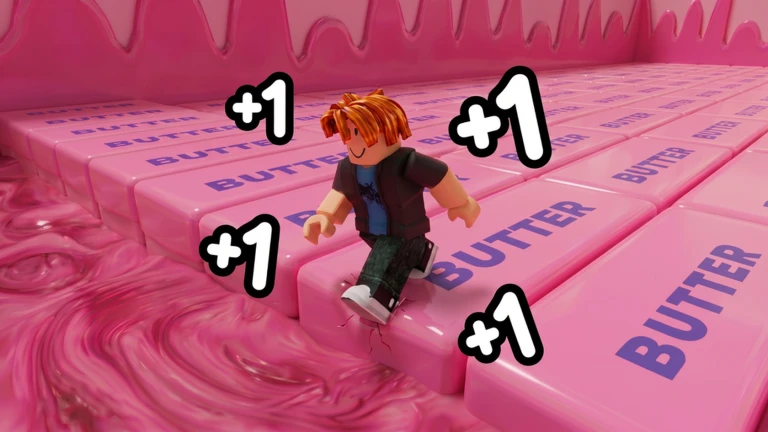
Open Roblox universe 10461810987 by Squishy Butter. Walk a safe opening segment to read the current Speed gain, then run and jump through the course using the material and obstacle cues shown by the client. Treat each failed jump as a route observation because the creator warns that one wrong move can return you to the start. Compare multipliers, races, and leaderboard attempts only from the visible session values. The official listing verifies the loop and named material families, but not a complete map, checkpoint system, shortcut, or fastest route.
Confirm the exact squishy escape
This guide covers Roblox universe 10461810987 and root place 107430889830807, published by Squishy Butter. The checked title carries a Summer update label, and Roblox classifies it as an Incremental Simulator with a 20-player server limit. Similar ASMR, keyboard, wax, butter, and squishy escape games may have different speed rules or courses. Match the universe and creator before applying a route. The official listing verifies the broad challenge, not a permanent map or a complete patch note.
Measure the current step-to-Speed result
The creator states that every step gives Speed. Start on a safe section and record the visible Speed before and after a short, repeatable walking interval. Do not convert the +1 title into a universal formula when a multiplier, event, treadmill, or update may affect the display. Record active effects and device conditions. This baseline helps you distinguish route difficulty from insufficient current Speed and lets you compare later progress without publishing a fixed gain rate that the official source does not fully specify.
Read the material families as course cues
The official description names regular butter, butter with wax cracks, NeeDoh, keyboard water and honey, and cloud squishies. These names verify themed material families, not their order, physics, hitboxes, timing, length, or checkpoint behavior. Use the visual and sound cue in the current client to identify the next section, then test its edge and landing conservatively. If a material behaves differently from a prior video, trust the current server. Do not turn a creator image into a complete obstacle map or claim that one surface is always easier.
Build a repeatable jump routine
Approach one obstacle with a consistent starting point, camera angle, and input. Record whether the failure came from takeoff, direction, landing, or a reset trigger. Change one variable on the next attempt. The creator confirms running and jumping but does not publish movement controls, jump values, device differences, or a guaranteed path. Use the prompts and controls shown on your platform. A clean routine is more useful than chasing an edited shortcut whose current hitbox and server state cannot be reproduced.
Plan for a return to the start
The creator warns that one wrong move can send the player back to the start. That supports a meaningful failure state but does not explain whether every section, mode, or server uses the same reset or whether checkpoints exist. Before a risky section, note your current Speed, route cue, and last safe position. After a reset, repeat only the segment that failed and avoid changing upgrades at the same time. If the client displays a checkpoint or protection option, read its exact wording rather than assuming it is permanent.
Treat multipliers as visible session choices
Powerful multipliers are part of the creator description, while official product records also expose treadmills, Luck labels, +2 Pet Equip, Multi Open, and 2x Win. These records do not provide complete descriptions, stacking rules, duration, eligibility, or a free-versus-paid progression model. Compare only the multiplier shown in your session and confirm the purchase wording before spending. Do not claim that a treadmill changes walking Speed, that Luck affects a specific hatch table, or that 2x Win applies to every reward without current evidence.
Use races and leaderboards as separate goals
The creator verifies races with friends or other players and global and regional leaderboards. It does not publish matchmaking rules, race rewards, leaderboard reset periods, country assignment, tie handling, or an official best time. Finish one controlled course attempt before using a leaderboard position to judge a route. Record the mode, region label, date, and visible result. A changing rank is a dated observation, not proof that a particular product, multiplier, or shortcut is optimal.
Refresh after the course meaning changes
Refresh this guide when the creator changes step-to-Speed behavior, material families, course reset rules, multipliers, races, leaderboards, products, or the current Summer content. CCU, visits, favorites, votes, badge totals, and a title decoration are counter or presentation changes, not instructions. Exact checkpoints, course order, physics, speed requirements, shortcuts, pet data, luck formulas, codes, rankings, and fastest routes stay held until current official text or replayable exact-universe captures support them.
What changed across observed Roblox snapshots
This is our own dated history of the same public Roblox fields. It shows observed movement, not a prediction or an explanation for why players moved.
Source: QuestSignal immutable release history · newest five observations shown
What this guide does not assume
This guide verifies exact identity, creator, server capacity, step-to-Speed progression, running and jumping, six named squishy material families, multipliers, races, global and regional leaderboards, reset-to-start risk, ASMR presentation, official product labels, media, and current demand. It does not certify a map, checkpoints, controls, physics, Speed rates, shortcuts, product effects, pet or Luck rules, rewards, codes, or fastest routes.
Refresh trigger: Refresh when official or replayable exact-game evidence materially changes Speed gain, the course, material families, failure recovery, multipliers, races, leaderboards, products, or the first-run task.