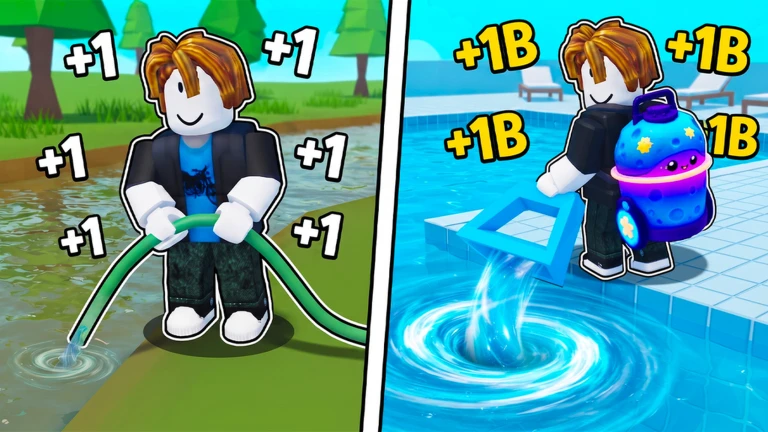
Confirm one visible click-to-Water change, use the current server's pool display to choose a reachable test, and compare your Fish, Wins, Water, and available upgrade choices before and after. Change one factor at a time; Roblox verifies the direction of the loop but does not publish fixed pool capacities, Fish odds, Pet multipliers, prices, or rebirth rules.
Start from the loop Roblox actually states
The current Roblox description lays out a clear sequence: every click gives Water, Water drains the pool, an emptied pool can reveal Fish, larger pools lead toward new areas, and new lakes extend the route. It also names upgrades, Wins, and Pets that boost Water. Use that sequence as a map, not as a complete formula sheet. Before copying a route from a recording, find the live Water display, the current pool or drain target, the Fish collection surface, the Wins display, and the upgrade or area choices visible to your account. The experience was created on July 25, 2026 and updated on August 15, so current server labels should overrule an older thumbnail or video title.
Measure one click before planning a pool
Record the Water value shown before one ordinary click, perform only that action, and record the value afterward. Repeat the same test once with the same equipped state. The title and official description say that every click gives plus one Water, while promotional artwork contrasts small and enormous rates. Those sources establish the theme, but they do not explain every boost, device, temporary multiplier, or update-specific rule. If your second test differs from the first, inspect the visible Pet, upgrade, device, or reward state before assuming a universal rate. A useful baseline is simply a reproducible before-and-after change that lets you judge the next pool attempt on the current server.
Choose a pool by visible evidence
Approach the first pool or drain target that the live route presents and inspect any displayed requirement, progress bar, interaction prompt, or remaining amount. Current creator media shows a basic hose, a larger device, and a dramatic pool vortex, but those are promotional scenes rather than a verified pool-capacity table. Make one short attempt and classify the result: the remaining amount moved, the target did not respond, a requirement blocked the attempt, or the interface was unclear. If progress moves, estimate only what your own display shows and keep the estimate dated. If it does not, change one variable—position, equipped device, visible upgrade, or target—before trying again.
Review the pool result before spending
The official description says emptying pools discovers rare and legendary Fish, and separately tells players to collect Wins. It does not guarantee which Fish appears from a specific pool, publish odds, or state that every pool awards the same Wins. Before the final part of a drain, note your current Fish collection, Wins, Water, and visible unlock state. After completion, compare those same four surfaces. Record only what clearly changed. If a Fish appears, store its displayed name and the pool or lake where you observed it, but do not infer a rarity rate from one result. If the completion is ambiguous, repeat a small reachable pool before buying several upgrades and losing the comparison.
Compare upgrades, Pets, areas, and lakes one at a time
Roblox verifies that upgrades can make draining faster, Pets provide Water boosts, larger pools unlock areas, and lakes contain further surprises. It does not publish a complete price curve, Pet multiplier table, area order, or best-build ranking. When two choices are visible, write down the cost, stated effect, and the next blocked task exactly as the server presents them. Change one item, then repeat the same Water baseline or pool test. This produces an account-specific comparison without claiming a permanent meta. Favor the choice that removes the next demonstrated bottleneck: gain speed when Water is too slow, drain capacity when the pool stalls, or route access when the next area is clearly gated. Leave hidden effects unknown.
End with a five-line session note
Save the review date, your reproducible Water baseline, the last pool or lake you completed, the Fish or Wins change you directly observed, and the next visible requirement. Add a sixth line only when a Pet or upgrade produced a repeatable before-and-after difference. This prevents promotional one-million or one-billion labels, an old noob-to-pro route, and your live account state from merging into a false universal guide. At the next session, rerun the smallest baseline before comparing progress. If the official description, media, pool interface, Fish collection, Wins display, upgrade menu, area gate, or lake route changes, start a new dated note and retire the previous assumptions.
What changed across observed Roblox snapshots
This is our own dated history of the same public Roblox fields. It shows observed movement, not a prediction or an explanation for why players moved.
Source: QuestSignal immutable release history · newest five observations shown
Use the dedicated +1 Drain Water Per Click site for deeper tasks
QuestSignal keeps discovery and dated history here. The exact-identity specialist site owns deeper game-specific coverage, so we link to it instead of duplicating a thinner version.
What this guide does not assume
The guide uses the current official click, Water, pool, Fish, Wins, upgrades, areas, lakes, and Pet statements plus creator-supplied media and reviewed exact-game task demand. It does not assert permanent drain rates, pool capacities, Fish odds or locations, Pet multipliers, upgrade prices, area costs, lake order, rebirth rules, code rewards, or fastest routes.
Refresh trigger: Refresh after a material title or description change, replacement official media, a verified live Water or pool-flow change, a changed Fish or Wins result, or a changed upgrade, area, or lake presentation.